
HEAT TRANSFER & THERMAL DESIGN
Make the thermal
tradeoffs visible.
Model heat transfer in an editor that connects equations, property calls, and thermal correlations. Refine the calculation with AI assistance, compare designs, and inspect the tradeoffs.
A = 30 m²
U = 0.5 kW/(m²·K)
01 / BUILD THE MODEL
Connect the physics to the design.
Describe the duty, operating conditions, and design constraints. Keep the engineering basis visible as the model takes shape.
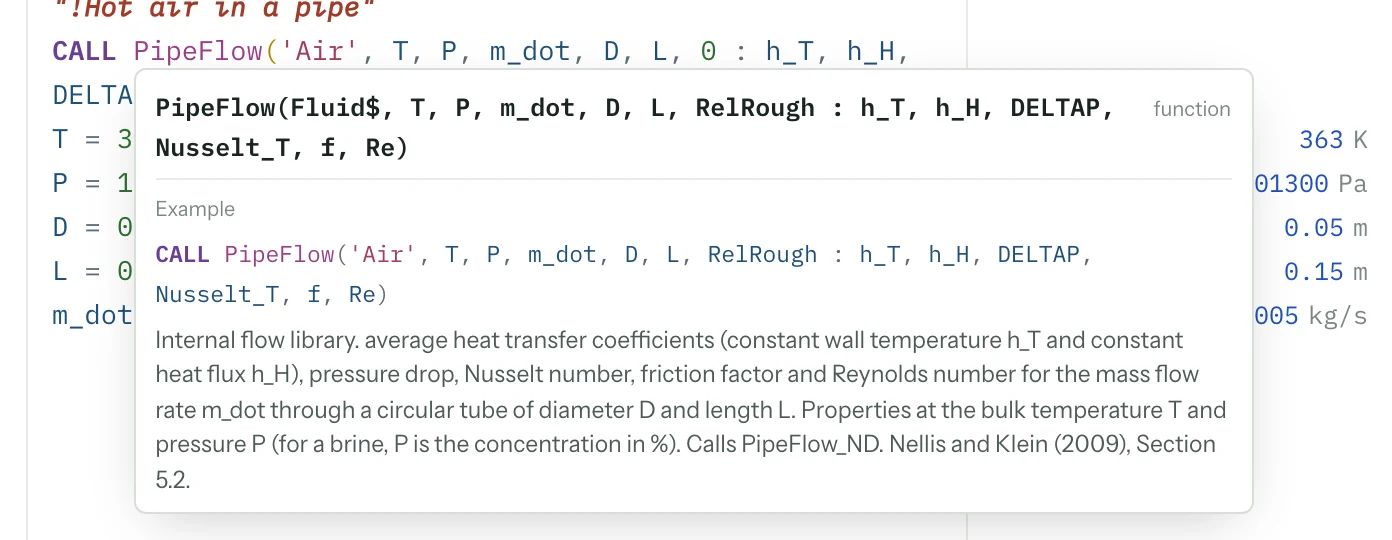
Ask the agent to build the thermal model around your problem. Built-in heat-transfer and fluid-flow routines connect properties and correlations to the energy balance, pressure drop, and sizing calculation. You can inspect and edit every relationship.
Autocomplete helps insert a routine and its arguments. Function help shows an example and its correlation source beside the equations. Expected-unit suggestions and unit warnings help you check the calculation as you edit; range warnings identify where a correlation needs a closer look.
02 / EXPLORE THE TRADEOFFS
How much area
is enough?
Right-click an area or flow-rate input and use Quick sweep to plot heat duty and outlet temperatures. Use Goal seek to find an input that meets a target, then review and apply the candidate. Min/Max adds bounded optimization when the question calls for a search.
Explore the heat-exchanger calculationSet the question.
Choose a target outlet temperature or a heat duty to compare.
Explore the range.
Parametric tables keep the operating cases together. Linked plots update when you rerun the study.
Inspect the candidate.
Trace the result through the equations and check the operating assumptions.
03 / UNDERSTAND THE UNCERTAINTY
Know which measurement deserves your attention.
The inputs are estimates. See how that uncertainty reaches the result.
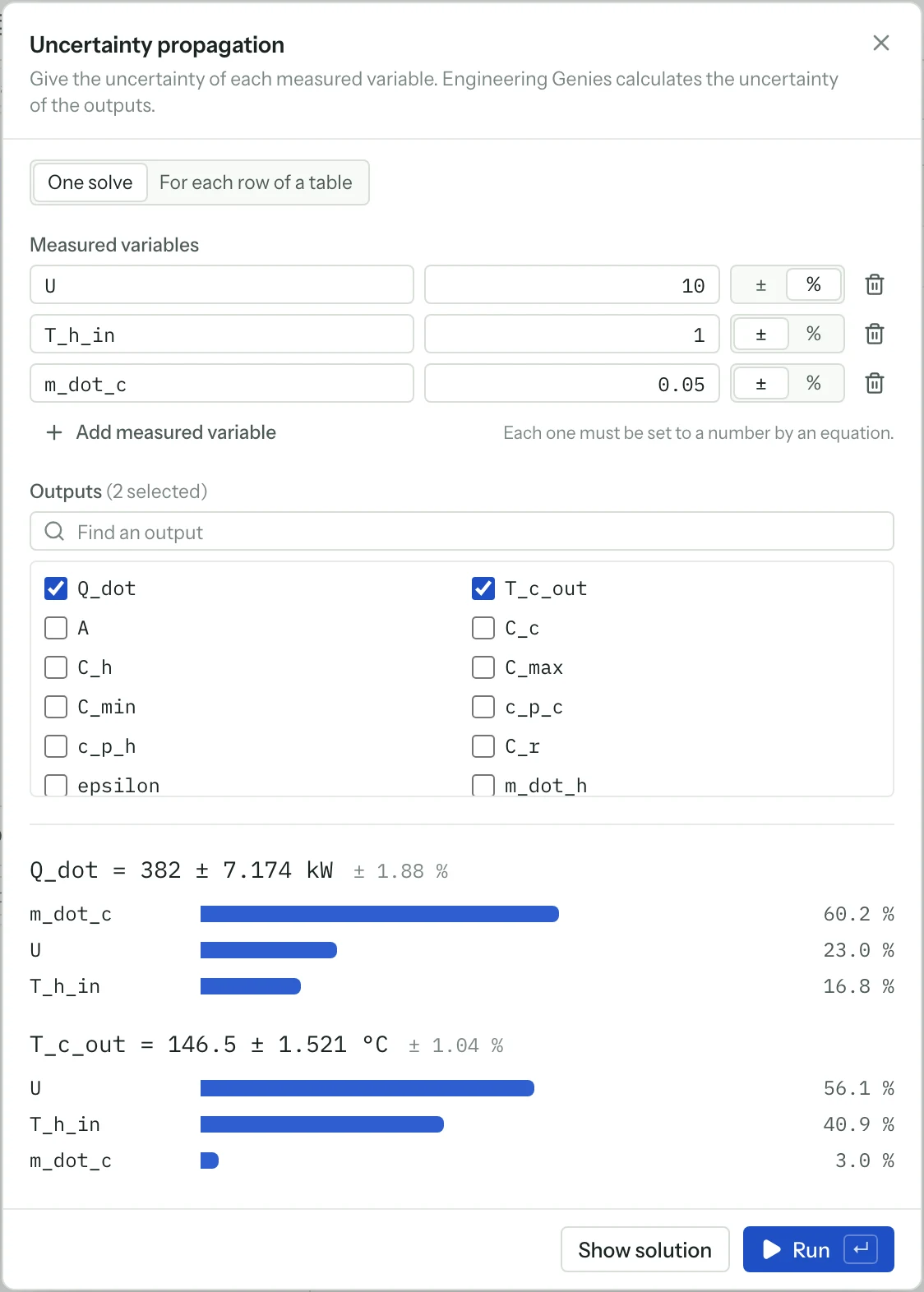
Assign absolute or relative uncertainties to measured inputs. Engineering Genius reports the uncertainty in each selected output and the contribution of each input.
60.2% of heat-duty uncertainty.
That tells you where better measurement could matter. It is a result for this example’s selected inputs and uncertainties.
The propagation method assumes independent inputs and small changes. It also runs across the rows of a parametric table.
THE WORK BEYOND ONE EXAMPLE
A thermal library to build on.
Use the routines your problem needs, with documented inputs, correlation sources, and applicability warnings.
Flow & convection
Pipe, duct and annular flow; external flow; free convection; impinging jets.
PipeFlow · DuctFlow · AnnularFlowExchangers & fins
Heat-exchanger effectiveness, LMTD correction, and fin efficiency routines.
HX: 18 type strings · LMTD_CFConduction & radiation
Transient wall, cylinder and sphere solutions, shape factors, radiation view factors, and blackbody functions.
PlaneWall_T · Cylinder_T · F2D_* · F3D_*Phase change
Boiling and condensation routines for models that need phase-change heat transfer.
Nucleate, film and flow boiling · film condensationCoverage depends on the selected routine and its valid range. Compact-exchanger surface data and regenerator packing datasets are not included. Imported models may use different correlations.
Review compatibilityFROM A QUESTION TO A WORKING MODEL
Start your next thermal design.
Describe the problem, review the model, and explore the alternatives.